

As AI data centers move toward higher rack densities, higher power consumption, faster networking, and increasingly complex liquid cooling systems, cable management is becoming a critical part of physical infrastructure.
Traditional cable trays were often treated as passive accessories used simply to keep cables organized. In modern AI facilities, that approach is no longer sufficient.
Power cables, high-speed network cables, control cables, sensor wiring, and auxiliary systems may all compete for limited routing space. At the same time, cable pathways must coexist with rack structures, cooling systems, maintenance areas, and other infrastructure.
This makes the aluminum cable tray for AI data centers an important structural component of the physical infrastructure.
A well-designed cable tray system must provide more than cable support. It should contribute to:
- Reliable cable routing
- Load distribution
- Lightweight infrastructure
- Thermal management
- Electromagnetic considerations
- Maintenance accessibility
- Future expansion
- Corrosion resistance
- Modular installation
The objective is therefore not simply to “organize cables.”
It is to create a scalable aluminum cable infrastructure that supports the long-term operation of high-density AI computing environments.
1. Why Cable Management Matters More in AI Data Centers
AI data centers can contain substantially more computing equipment and associated infrastructure within each rack.
A single high-density AI rack may require multiple cable categories:
- High-current power cables
- AC or DC distribution cables
- GPU and server networking cables
- Fiber-optic connections
- Management and control cables
- Sensor wiring
- Cooling-system control cables
- Leak-detection wiring
- Facility monitoring connections
As rack power and network bandwidth increase, cable routing becomes increasingly interconnected with the overall facility design.
Poor cable management can create:
- Congested pathways
- Excessive cable bending
- Difficult maintenance
- Blocked airflow
- Interference with cooling infrastructure
- Excessive structural loading
- Difficult future expansion
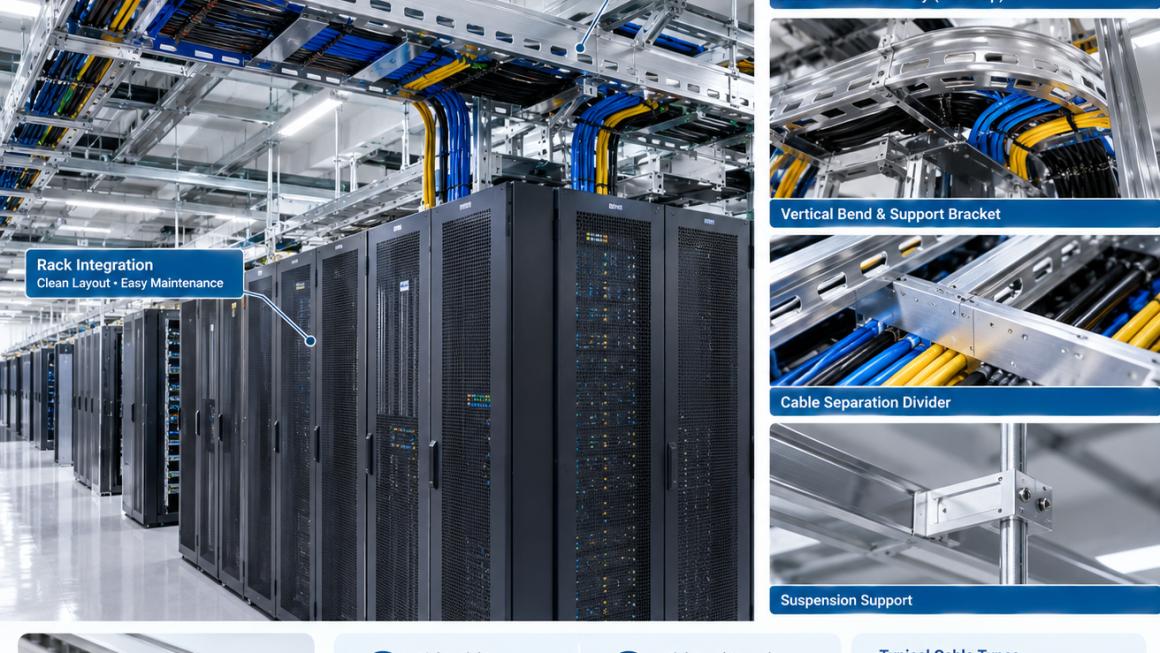
For this reason, an AI data center cable tray should be considered part of the infrastructure architecture rather than an afterthought.
2. Cable Trays Are Part of the Physical Infrastructure
A useful way to think about AI data center infrastructure is as a series of interconnected physical layers:
Rack Structure → Power Distribution → Cooling Infrastructure → Network Infrastructure → Cable Management → Monitoring and Maintenance
Cable trays connect many of these systems.
They may carry cables between:
- Power distribution equipment and racks
- Network switches and server racks
- Rack rows and overhead pathways
- Cooling equipment and control systems
- Monitoring systems and equipment cabinets
The cable tray therefore becomes part of the physical load-bearing and routing architecture of the facility.
This changes how it should be designed.
Instead of asking:
How can we hold these cables?
Engineers should ask:
How should the cable infrastructure support the computing, power, cooling, and maintenance architecture of the facility?
3. Why Aluminum Is Attractive for AI Data Center Cable Trays
Aluminum offers several characteristics that are useful for cable infrastructure.
Lightweight Construction
One of the most obvious advantages is low density.
A lighter cable tray can simplify:
- Installation
- Handling
- Support structure requirements
- Retrofit projects
- Modular expansion
This can be particularly useful when cable pathways are installed above racks or equipment rooms.
Corrosion Resistance
Aluminum naturally forms a protective oxide layer.
With appropriate alloy selection and surface treatment, aluminum cable trays can provide useful resistance to many indoor and industrial environments.
This can be valuable for facilities where cable infrastructure is expected to remain in service for many years.
Thermal Conductivity
Aluminum has relatively high thermal conductivity compared with many structural materials.
While a cable tray should not be treated as a primary cooling device, its material characteristics can support heat dissipation from cables and surrounding components.
Manufacturing Flexibility
Aluminum can be produced through:
- Extrusion
- Sheet forming
- CNC machining
- Cutting
- Drilling
- Joining
This allows cable trays to be developed in different geometries according to installation requirements.
4. Lightweight Cable Management Does Not Mean Weak Cable Management
The objective of lightweight cable management is not simply to minimize material.
The cable tray must still withstand:
- Cable weight
- Installation loads
- Local concentrated loads
- Support spacing
- Vibration
- Thermal movement
- Maintenance activity
A lightweight design therefore needs efficient structural geometry.
For example, an aluminum extrusion can incorporate:
- Reinforcing ribs
- Flanges
- Mounting channels
- Drainage features
- Cable separators
- Attachment points
This can increase structural efficiency without unnecessarily increasing wall thickness.
The basic principle is:
Reduce unnecessary material → Optimize geometry → Maintain required stiffness and load capacity
5. Cable Tray Load Capacity in High-Density AI Facilities
Cable weight can become significant when many power and communication cables share the same pathway.
Engineers should evaluate:
- Total cable mass
- Tray width
- Tray depth
- Support spacing
- Span length
- Deflection
- Connection strength
- Local concentrated loads
The tray should not be designed solely around an average distributed load.
Installation and maintenance can introduce temporary loads that are very different from normal operating conditions.
For example, technicians may place or temporarily support cables during installation.
Therefore, the complete structural system should be evaluated:
Cable Load → Tray → Connection → Support Bracket → Building Structure
The tray is only one part of the load path.
6. Extruded Aluminum Cable Trays
Extrusion can be particularly useful when a cable tray needs repeatable geometry and integrated functional features.
An extruded aluminum cable tray may include:
- Side rails
- Structural ribs
- Mounting channels
- Cable retention features
- Cover interfaces
- Bracket attachment points
This approach can reduce the number of secondary components required during installation.
Customized profiles can also be developed when a project has specific requirements for:
- Width
- Height
- Load capacity
- Cable separation
- Rack integration
- Support spacing
For larger production volumes, dedicated extrusion tooling may provide an efficient manufacturing route.
For smaller projects, semi-standard profiles combined with CNC machining or secondary fabrication may be more appropriate.
7. Open Tray vs. Solid Tray Design
Cable trays can generally be configured with open or more enclosed structures.
Open Cable Trays
Open designs provide:
- Easy cable access
- Good visual inspection
- Easy installation
- Ventilation around cables
- Simple maintenance
They can be particularly useful for high-density network and power routing where frequent access is expected.
Solid or Covered Designs
Covered configurations can provide additional protection against:
- Dust
- Falling objects
- Mechanical contact
- Certain environmental conditions
However, enclosure can reduce accessibility and influence thermal behavior.
The correct choice depends on the installation environment rather than on a universal preference.
8. Cable Separation Is Critical in AI Infrastructure
Not all cables should necessarily share the same pathway.
AI data centers may contain combinations of:
- High-current power cables
- Low-voltage control wiring
- High-speed copper networking
- Fiber optics
- Sensor cables
The physical arrangement should consider electrical and operational requirements.
A cable tray system can incorporate:
- Separate compartments
- Dividers
- Independent tray levels
- Dedicated pathways
A simplified architecture might be:
Power → Dedicated Path
High-Speed Data → Dedicated Path
Control/Sensor → Dedicated Path
This makes the cable infrastructure easier to understand and maintain.
9. Power Cable Management for High-Density AI Racks
AI racks can have significantly higher power requirements than conventional IT racks.
As a result, power cable routing becomes a major design consideration.
The tray must accommodate:
- Larger cable sizes
- Greater cable quantities
- Increased bending requirements
- Higher cable weight
- Larger termination areas
The routing architecture should avoid unnecessarily tight bends and should provide sufficient space around connection points.
Cable tray geometry should therefore be coordinated with the power distribution architecture from the beginning.
10. Network Cable Routing and Bend Radius
High-speed networking introduces another important consideration: cable geometry.
Copper and fiber cables have defined minimum bend-radius requirements.
Excessive bending can affect:
- Signal integrity
- Connector reliability
- Fiber performance
- Long-term cable life
A cable tray should therefore provide smooth routing transitions.
Important design features can include:
- Large-radius corners
- Rounded edges
- Vertical transitions
- Cable retention features
- Sufficient tray width
The tray should support the cable without forcing it into an unsuitable routing path.
11. Protecting Cables From Aluminum Structures
Aluminum is relatively soft compared with many structural metals, but improperly finished edges can still damage cable jackets.
Potential problems include:
- Sharp cut edges
- Burrs
- Machining residue
- Abrasion points
- Fastener protrusions
Therefore, aluminum cable infrastructure should include appropriate finishing and inspection.
Possible measures include:
- Deburring
- Edge rounding
- Protective inserts
- Polymer edge guards
- Controlled fastener positioning
This is particularly important for power cables and flexible communication cables that remain in contact with structural elements for long periods.
12. Cable Trays and Liquid Cooling Infrastructure
AI data center cable management increasingly has to coexist with liquid cooling.
A high-density rack environment may contain:
- Coolant supply lines
- Return lines
- Manifolds
- Quick-disconnect couplings
- Power cables
- Network cables
These systems require coordinated routing.
Cable trays should not unintentionally interfere with:
- Cooling hoses
- Maintenance access
- Manifold locations
- Leak detection
- Drainage paths
A useful design principle is to establish separate physical zones:
Electrical Infrastructure
↓
Data Infrastructure
↓
Liquid Cooling Infrastructure
with sufficient clearance and defined crossing points.
13. Cable Tray Placement Around AI Racks
The location of the cable tray can influence both installation and maintenance.
Common configurations include:
Overhead Routing
Cable trays are installed above rack rows.
Advantages include:
- Clear floor space
- Easy row-level distribution
- Flexible future routing
Underfloor Routing
Cables are routed beneath the raised floor or equipment area.
This can provide a clean overhead environment but may increase maintenance complexity depending on the facility layout.
Side or Rack-Level Routing
Cable trays can also be integrated near or directly alongside racks.
This can shorten cable runs but requires careful coordination with rack access and service clearance.
There is no universal best location.
The optimal architecture depends on:
Rack Layout + Power Distribution + Cooling Layout + Network Architecture + Maintenance Strategy
14. Supporting Cable Trays Above High-Density Racks
Overhead cable infrastructure must be structurally coordinated with the building or support system.
The load path may be:
Cable → Aluminum Tray → Support Bracket → Suspension System → Building Structure
Engineers should consider:
- Tray span
- Support spacing
- Cable weight
- Seismic or vibration requirements where applicable
- Installation loads
- Thermal movement
- Expansion joints
The aluminum tray should not be treated as an independent structure.
Its supporting system is equally important.
15. Thermal Considerations for Cable Infrastructure
Power cables generate heat.
As electrical loading increases, cable temperature becomes an important engineering parameter.
Cable tray design can influence the surrounding environment by affecting:
- Cable spacing
- Air exposure
- Heat accumulation
- Routing density
Open tray structures can allow greater exposure to surrounding air than fully enclosed pathways.
However, cable thermal performance ultimately depends on the complete electrical installation, including cable type, loading, spacing, ambient conditions, and installation method.
The role of the cable tray is to avoid creating unnecessary thermal constraints.
16. Designing for Cable Density
One of the biggest mistakes in cable infrastructure is designing only for today’s cable quantity.
AI infrastructure can evolve quickly.
A rack may later require:
- Additional GPUs
- Additional power feeds
- Higher-speed networking
- More sensors
- Additional cooling controls
A cable tray that is already filled to capacity leaves little room for change.
A better approach is to establish a practical expansion allowance.
The exact allowance should depend on the facility and project requirements, but the principle is straightforward:
Design today’s infrastructure with tomorrow’s routing requirements in mind.
17. Modular Aluminum Cable Infrastructure
Aluminum is well suited to modular infrastructure because profiles and components can be designed around repeatable dimensions.
A modular cable tray system may include:
- Straight sections
- Horizontal bends
- Vertical bends
- Cross sections
- Mounting brackets
- Covers
- Dividers
- End sections
Standardized connection points can simplify installation and future expansion.
This can be particularly valuable when an AI data center is built in phases.
For example:
Phase 1 → Initial AI Racks
Phase 2 → Additional GPU Capacity
Phase 3 → Higher-Density Compute
The cable infrastructure can evolve with the computing environment.
18. Aluminum Cable Trays for Retrofit Projects
Not every AI deployment starts with a new data center.
Many AI computing systems are installed into existing facilities.
Retrofit projects can have constraints involving:
- Existing ceiling structures
- Existing racks
- Limited floor loading
- Existing cable pathways
- Restricted installation space
The low weight of aluminum can be advantageous in some retrofit situations, particularly when overhead structures have limited additional load capacity.
However, the complete support structure must still be evaluated.
Lightweight does not mean that structural verification can be skipped.
19. Maintenance and Accessibility
Cable management should make maintenance easier rather than simply making the installation look organized.
Technicians may need to:
- Identify individual cables
- Replace network connections
- Add power cables
- Trace control wiring
- Inspect connectors
- Modify rack configurations
A good cable tray system should provide sufficient access for these tasks.
Important considerations include:
- Tray height
- Tray width
- Cover removal
- Cable identification
- Separation between pathways
- Access around connectors
- Clear maintenance zones
Cable infrastructure should therefore be designed around actual maintenance workflows.
20. Cable Identification and Future Expansion
Physical organization becomes much more valuable when combined with clear identification.
A structured cable infrastructure can support:
- Cable labels
- Tray identification
- Rack identification
- Pathway numbering
- Power-path identification
- Network-path identification
This reduces the time required to trace connections.
For large AI facilities, physical cable management and digital infrastructure management should ideally complement each other.
The physical architecture provides the routing framework.
Documentation and monitoring provide operational visibility.
21. Corrosion and Material Compatibility
Although aluminum has good natural corrosion resistance, environmental conditions still need to be considered.
Potential factors include:
- Humidity
- Industrial contaminants
- Salt exposure
- Chemical environments
- Contact with dissimilar metals
Particular attention should be paid to connections between aluminum and other metals.
Direct contact between dissimilar metals under suitable environmental conditions can create galvanic corrosion risks.
Possible engineering measures include:
- Appropriate fastener selection
- Isolation washers
- Protective coatings
- Controlled contact surfaces
- Suitable surface treatment
Material compatibility should be considered at the system level.
22. Surface Treatment for Aluminum Cable Infrastructure
Surface treatment can be selected according to environmental and functional requirements.
Common options include:
- Anodizing
- Chemical conversion treatment
- Powder coating
- Mechanical finishing
Selection may depend on:
- Corrosion resistance
- Appearance
- Wear resistance
- Electrical requirements
- Installation environment
- Contact with other materials
For large cable infrastructure projects, consistency of surface treatment can also contribute to long-term appearance and quality control.
23. Manufacturing Aluminum Cable Trays
A typical aluminum cable tray manufacturing process may include:
Aluminum Alloy Selection
↓
Extrusion or Sheet Forming
↓
Cutting
↓
CNC Machining / Drilling
↓
Deburring
↓
Surface Treatment
↓
Assembly
↓
Dimensional Inspection
↓
Load and Functional Validation
The exact process depends on the tray architecture.
Extrusion is attractive when a structural profile with integrated functions is required.
Sheet fabrication may be more appropriate for certain large or enclosed tray configurations.
Hybrid manufacturing can combine the advantages of both.
24. Quality Control for AI Data Center Cable Trays
Cable infrastructure may appear mechanically simple, but dimensional consistency is important.
Quality control can include:
Dimensional Inspection
Check:
- Width
- Height
- Length
- Hole position
- Connection geometry
Surface Inspection
Check:
- Burrs
- Scratches
- Coating consistency
- Edge quality
Structural Validation
Check:
- Load capacity
- Deflection
- Connection strength
Assembly Verification
Check:
- Bracket fit
- Joint alignment
- Cover compatibility
- Modular connection
A consistent manufacturing process helps ensure that multiple tray sections can be installed together without excessive adjustment on site.
25. Designing Cable Trays Together With the Rack
The cable tray should not be designed independently from the server rack.
The relationship between them determines:
- Cable entry points
- Vertical routing
- Connector access
- Power distribution
- Network connections
- Maintenance clearance
For example:
AI Rack → Cable Exit → Vertical Transition → Overhead Tray → Main Distribution Path
If these interfaces are defined early, cable lengths can be optimized and unnecessary routing complexity can be reduced.
This is particularly important in high-density GPU deployments where cable quantities can become substantial.
26. Common Cable Tray Design Mistakes
Mistake 1: Treating the tray as an accessory
This often results in poor integration with racks, power systems, and cooling infrastructure.
Mistake 2: Designing only for current cable quantity
Future AI expansion can quickly consume remaining capacity.
Mistake 3: Ignoring cable weight
High-density power infrastructure can impose substantial structural loads.
Mistake 4: Using insufficient support spacing
Long spans can produce excessive deflection.
Mistake 5: Ignoring bend radius
Tight routing can compromise cable reliability.
Mistake 6: Mixing incompatible cable categories without planning
Power, data, and control systems may require different routing strategies.
Mistake 7: Leaving sharp aluminum edges
Poor finishing can damage cable jackets.
Mistake 8: Blocking maintenance access
A visually organized pathway can still be difficult to service.
Mistake 9: Ignoring the support structure
A strong tray cannot compensate for an inadequate suspension system.
27. A Practical Design Workflow
A systematic approach can make cable infrastructure development more efficient.
Step 1: Map the Infrastructure
Identify:
- Rack locations
- Power sources
- Network equipment
- Cooling equipment
- Maintenance zones
Step 2: Classify Cable Types
Separate:
- Power
- Data
- Control
- Sensor
- Auxiliary systems
Step 3: Estimate Cable Loading
Evaluate:
- Cable quantity
- Cable mass
- Tray occupancy
- Support spacing
Step 4: Define Routing Paths
Establish:
- Main pathways
- Rack branches
- Vertical transitions
- Expansion routes
Step 5: Select Tray Architecture
Determine:
- Extruded or fabricated construction
- Open or covered design
- Width and depth
- Divider requirements
Step 6: Design the Support System
Verify:
- Brackets
- Suspension
- Connections
- Building interfaces
Step 7: Validate Serviceability
Check:
- Cable access
- Replacement paths
- Label visibility
- Future expansion
Step 8: Prototype and Test
Validate:
- Structural performance
- Installation
- Cable routing
- Fit and compatibility
This workflow helps transform cable management from a reactive installation task into a controlled engineering process.
28. The Future of Aluminum Cable Infrastructure in AI Data Centers
As AI computing infrastructure becomes more modular and distributed, cable management will also become more integrated.
Future systems may combine:
- Lightweight aluminum structural trays
- Modular rack interfaces
- Integrated cable separation
- Thermal-aware routing
- Sensor-ready infrastructure
- Quick-install connection systems
- Configurable support structures
The cable tray may increasingly become part of a larger physical infrastructure platform.
Instead of treating:
Rack + Cable Tray + Cooling + Power
as separate systems, engineers can increasingly design them as interconnected mechanical infrastructure.
Cable Management Is Infrastructure
The aluminum cable tray for AI data centers should not be viewed simply as a metal accessory for organizing wires.
In high-density AI environments, cable pathways influence structural loading, installation efficiency, thermal conditions, maintenance access, scalability, and overall infrastructure reliability.
Aluminum provides a useful platform because it combines:
Lightweight Construction + Structural Efficiency + Corrosion Resistance + Thermal Conductivity + Manufacturing Flexibility
But the real value comes from system-level design.
The best AI data center cable tray is one that is designed together with the rack, power distribution, network architecture, cooling system, support structure, and maintenance strategy.
A practical design philosophy is:
Infrastructure Mapping → Cable Classification → Load Analysis → Routing Architecture → Aluminum Structure → Support System → Serviceability → Validation
When cable management is treated as part of the physical infrastructure rather than an accessory, it becomes possible to build AI data centers that are easier to install, maintain, expand, and adapt to future computing requirements.
For aluminum manufacturers and engineering partners, this creates opportunities beyond conventional profiles and brackets: custom extruded cable trays, modular aluminum cable infrastructure, rack-integrated routing systems, and application-specific structural components can all become part of the next generation of AI data center infrastructure.