

High-density GPU racks require more than a strong structural frame and an effective cooling system. As computing power increases, power cables, high-speed data connections, monitoring wires, and liquid-cooling hoses must all fit within increasingly constrained spaces.
Poor cable routing can obstruct airflow, complicate component replacement, increase mechanical stress on connectors, and make maintenance more difficult. In liquid-cooled systems, inadequate separation and support can also create unnecessary strain on hoses and fittings.
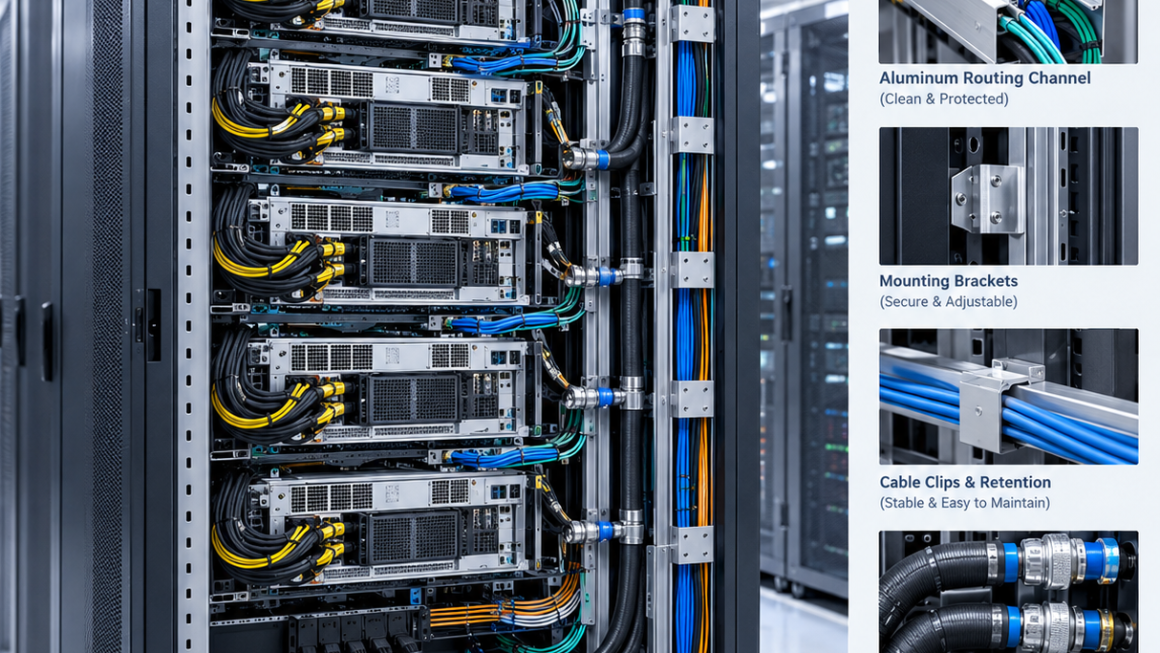
Aluminum cable management for GPU racks provides a practical way to organize these connections through cable trays, routing channels, mounting rails, brackets, and modular support structures.
However, effective cable management is not simply about bundling cables neatly. It requires coordinated mechanical planning that considers electrical requirements, signal integrity, bend radius, cooling interfaces, service access, and manufacturing constraints.
This guide explains how to design aluminum cable management hardware for high-density AI infrastructure.
1. Why Cable Management Matters in High-Density GPU Racks
A GPU rack may contain multiple servers, power distribution components, networking equipment, monitoring devices, and liquid-cooling infrastructure. Each subsystem introduces its own routing requirements.
As rack density increases, the available space for connections becomes more difficult to manage.
Common challenges include:
- Power cable congestion: High-current power connections may require substantial cable cross-sections and adequate space for routing and strain relief.
- High-speed data connections: Fiber-optic and copper interconnects may have specific bend-radius and handling requirements.
- Sensor wiring: Temperature, pressure, leak detection, and other monitoring cables need reliable routing without interfering with service operations.
- Liquid-cooling hoses: Supply and return hoses require sufficient clearance, support, and access to fittings.
- Airflow obstruction: Poorly positioned cable bundles can interfere with intended cooling airflow in air-cooled areas.
- Maintenance access: Technicians need to remove components, disconnect interfaces, and inspect connections without disturbing unrelated systems.
Cable management should therefore be treated as part of the rack’s mechanical architecture rather than an accessory added after the main structure is complete.
2. Separate Routing Paths for Different Connection Types
Not every cable or hose should follow the same route. Power, data, monitoring, and coolant connections have different mechanical and operational requirements.
A useful starting point is to assign each connection type a preferred routing zone.
| Connection type | Main design considerations | Suitable management features |
|---|---|---|
| Power cables | Current rating, cable size, heat, connector clearance, strain relief | Dedicated trays, supports, protective channels |
| High-speed data cables | Bend radius, connector protection, signal requirements | Smooth routing channels, fiber guides, retention clips |
| Sensor and control wiring | Identification, accessibility, interference management | Small channels, removable covers, labeled attachment points |
| Liquid-cooling hoses | Bend radius, fitting clearance, movement, leak inspection | Hose supports, separated routing paths, accessible brackets |
| Mixed connection bundles | Congestion, serviceability, separation requirements | Modular trays and independently removable routing sections |
These zones do not always need to be physically isolated by rigid barriers. Their arrangement should follow the electrical, thermal, mechanical, and safety requirements of the system.
For example, sensitive signal connections may need separation from power wiring depending on the cable construction, electromagnetic environment, and system specifications. Fiber-optic cables do not present the same electrical interference concerns as copper data cables, but they still require mechanical protection and appropriate bend-radius control.
Similarly, coolant hoses should not be forced into a cable tray simply because space is available. They require support and routing appropriate to their own mechanical and fluid-system requirements.
3. Designing Aluminum Cable Trays for GPU Racks
Aluminum cable trays provide a structured path for distributing connections across a rack or between equipment modules.
They can be manufactured as extruded channels, fabricated trays, or CNC-machined support components, depending on the required geometry and production volume.
Choose the right tray configuration
Different routing locations may require different tray designs:
- Horizontal trays for routing connections across a rack
- Vertical channels for distributing cables between rack levels
- Side-mounted channels for keeping the central equipment area clear
- Removable covers for protecting connections while allowing inspection
- Dedicated support brackets for connecting trays to the main frame
The correct configuration depends on rack dimensions, connection density, access requirements, and the location of power and cooling interfaces.
Avoid excessive tray fill
A tray that is too small can create crowded bundles, difficult cable removal, and insufficient space for future connections.
A tray that is unnecessarily large can consume valuable rack volume and complicate mounting.
Engineers should estimate the total cable envelope using actual cable diameters, bundle arrangements, connector sizes, and planned additions. They should also account for applicable tray-fill, separation, thermal, and installation requirements rather than relying on a universal fill percentage.
Consider access and drainage
Where the environment and application require it, tray geometry should facilitate inspection, cleaning, and drainage.
Removable covers can protect cables from accidental contact, but they should not prevent technicians from inspecting connections or identifying a damaged cable.
For liquid-cooled racks, the placement of cable trays should also consider potential leak paths. Cable routing should not obstruct leak detection devices or make coolant fittings difficult to inspect.
4. Aluminum Cable Routing Channels: Extruded or Fabricated?
Aluminum cable routing channels can be produced using several manufacturing approaches. The choice affects design flexibility, tooling investment, assembly, and unit cost.
Custom aluminum extrusions
Extruded channels are useful when a routing geometry will be repeated across many rack assemblies.
A custom profile can incorporate:
- Integrated mounting slots
- Rounded internal corners
- Retention features for removable covers
- Channels for mounting clips
- Reinforcing ribs
- Interfaces for connecting adjacent sections
These features can simplify assembly and create a consistent routing path.
Fabricated aluminum trays
Fabricated trays may be more practical when the design requires large flat sections, bends, cutouts, or relatively simple geometry.
They can also be useful during early development when the final routing layout is not yet stable.
CNC-machined components
CNC machining is useful for brackets, connector supports, precision mounting interfaces, and specialized components that must fit a defined rack geometry.
For many projects, a combination of extrusion, fabrication, and machining is more practical than using one process for every component.
The manufacturing decision should consider the required geometry, mechanical loads, tolerances, surface finish, expected order quantity, and assembly sequence.
5. Managing Power Cables Without Creating Mechanical or Thermal Problems
Power cables in high-density GPU racks can be relatively thick and difficult to route, especially around power distribution units and server power connectors.
Their management must account for electrical ratings and the physical behavior of the complete cable assembly.
Plan the cable envelope
The design should include cable diameter, connector dimensions, bend requirements, and the space needed to install or disconnect each connection.
A cable that fits in its operating position may still be impossible to install conveniently if the connector cannot be maneuvered into place.
Support cable weight
Heavy cable bundles can place sustained loads on connectors and mounting points.
Cable trays, retention brackets, and strain-relief features should carry the appropriate portion of the cable load so that connectors are not used as structural supports.
Support spacing should be selected according to cable characteristics and the applicable installation requirements.
Avoid damaging contact points
Sharp edges, narrow gaps, and poorly positioned fasteners can damage cable jackets over time.
Aluminum channels should therefore be designed with appropriate edge finishing, protective features, and clearance around cable entry and exit points.
Consider heat and electrical separation
High-current cables may generate heat depending on their current, conductor size, insulation, grouping, and ambient conditions.
Cable management hardware should not create an arrangement that prevents the required thermal performance or violates applicable electrical installation requirements.
The tray material itself does not determine whether a cable arrangement is safe. The complete electrical design must be evaluated against the applicable specifications.
6. Protecting High-Speed Data and Fiber-Optic Connections
High-speed GPU systems rely on connections between accelerators, servers, switches, storage equipment, and other network infrastructure.
These links may use copper cables, optical fiber, or a combination of connection technologies. Their routing requirements differ, so the cable management system should reflect the actual interconnect design.
Respect the specified bend radius
Tight bends can affect optical performance, cable integrity, or connector reliability, depending on the cable construction.
Copper data cables may also have specified minimum bend radii and handling requirements.
The relevant cable manufacturer’s specifications should determine the permitted bend geometry. A generic radius should not be applied to every cable type.
Protect connector access
High-speed connectors can be difficult to access in densely packed racks. Routing channels should leave enough room to insert, release, and inspect connectors without applying unnecessary force.
Where connections are frequently replaced, removable guides and accessible attachment points may be more practical than permanently enclosed routing paths.
Avoid excessive compression
Cable ties, clips, and covers should retain cables without crushing them or introducing excessive pressure.
For optical fiber, particular attention should be paid to cable-specific handling instructions. A visually tidy bundle is not necessarily a mechanically acceptable bundle.
Preserve separation where required
Copper data connections and power cables may need separation based on electromagnetic compatibility requirements and cable specifications.
Fiber-optic links are generally immune to electromagnetic interference in the optical transmission path, but their connectors and physical routing still require protection.
Good routing design should minimize unnecessary crossings and make each cable path easy to identify during troubleshooting.
7. Routing Sensor and Control Wiring
Sensor wiring is often smaller than power and data cabling, but it can be essential to reliable operation.
Temperature sensors, pressure transducers, leak detection systems, fan monitoring, and other control devices may be distributed throughout the rack.
If sensor cables are mixed indiscriminately with other connections, they can become difficult to trace or accidentally disconnect during maintenance.
Create identifiable routing paths
Dedicated small channels or clips can help organize sensor wiring and distinguish it from power and data connections.
The design should allow technicians to trace cables between the sensor and its monitoring interface without dismantling large cable bundles.
Provide slack at service points
Some connections need a controlled amount of slack to accommodate module removal, door movement, or equipment replacement.
Excessive slack can obstruct airflow or become trapped behind removable hardware. Insufficient slack can place stress on connectors.
The appropriate arrangement depends on the movement required during service.
Plan for replacement
Replaceable sensor cables should be accessible without disturbing unrelated connections whenever practical.
Removable covers, open routing sections, and modular clips can simplify inspection and reduce maintenance time.
Where the monitoring system includes leak detection, the cable layout should preserve access to detection elements and avoid creating hidden areas that are difficult to inspect.
8. Integrating Liquid-Cooling Hoses into the Rack Layout
Liquid-cooling hoses introduce additional mechanical requirements because they carry coolant and connect to components that may need periodic inspection or replacement.
Their routing should be coordinated with cable trays, GPU mounting structures, manifolds, and service access.
Respect hose bend radius
Hoses have minimum bend-radius limits determined by their construction, diameter, reinforcement, and operating conditions.
Bends that are too tight can increase mechanical stress, restrict flow in some configurations, or shorten hose service life.
The hose manufacturer’s specifications should be used to establish the permitted bend radius.
Avoid connector side loads
A hose should not pull sideways on a fitting or force a quick-disconnect coupling into a misaligned position.
Support brackets can help carry hose weight and control movement, but their placement should allow for the movement required during installation and servicing.
Keep fittings accessible
Quick-disconnect couplings, manifold connections, and other serviceable interfaces should remain accessible for inspection and controlled disconnection.
Routing hoses behind permanent cable bundles may make maintenance unnecessarily difficult.
Account for leak inspection
Hose routing should not hide important connections from inspection or obstruct leak detection devices.
Where practical, the layout should make fittings visible and allow technicians to access relevant areas without removing unrelated hardware.
Keep coolant and electrical routing coordinated
The design should consider the possible consequences of a leak and follow the system’s electrical protection and coolant-management requirements.
Physical separation may be appropriate in certain locations, but the correct arrangement depends on the equipment architecture and applicable safety requirements.
An aluminum cable tray should not be assumed to provide a liquid-tight barrier unless it has been specifically designed and qualified for that purpose.
9. Bend Radius, Clearance, and Routing Geometry
Bend radius is only one part of a reliable routing design. The complete path must also accommodate connector length, installation movement, support locations, and clearance from neighboring components.
A useful routing review should consider the following:
| Design factor | What engineers should verify |
|---|---|
| Minimum bend radius | Compliance with the cable or hose manufacturer’s specification |
| Connector envelope | Space for insertion, release, and replacement |
| Support spacing | Adequate mechanical support without excessive compression |
| Edge protection | No damaging contact with sharp edges or fasteners |
| Clearance | No interference with GPU modules, fans, panels, or moving parts |
| Service slack | Enough controlled movement for planned maintenance |
| Separation | Compliance with electrical, EMC, coolant, and safety requirements |
| Future capacity | Space for anticipated additional connections, if required |
These checks should be completed in the three-dimensional rack layout before the cable management hardware is finalized.
A physical prototype can help identify routing conflicts that may be overlooked in a drawing, particularly around connectors, quick-disconnect fittings, and removable GPU modules.
10. Designing for Maintenance and Fast Replacement
In high-density GPU infrastructure, maintenance time can be affected by how easily connections can be identified, accessed, and replaced.
A cable management system should support the intended service procedure rather than simply maximizing packing density.
Useful design features include:
- Removable tray covers
- Accessible mounting clips
- Separate routing sections for independently serviceable systems
- Clear access to power and data connectors
- Dedicated hose supports around serviceable cooling interfaces
- Replaceable brackets and modular channel sections
- Consistent routing and identification practices
Where a GPU module is designed for replacement, the surrounding cable paths should allow the required extraction movement.
The same principle applies to liquid-cooled hardware. If disconnecting a coolant line requires moving a large power bundle, the routing layout may need to be revised.
Maintenance access should be evaluated during design reviews and prototype assembly, not left until the first service event.
11. Material Selection and Surface Treatment
Aluminum offers a combination of low weight, corrosion resistance, formability through extrusion, and compatibility with a range of machining and finishing processes.
For cable management hardware, the appropriate material and finish depend on the operating environment and the function of the component.
Potential design considerations include:
- Structural requirements for tray spans and mounting brackets
- Wall thickness and resistance to local deformation
- Edge quality around cable contact points
- Compatibility with the intended fasteners and adjoining materials
- Surface finish and corrosion protection
- Electrical bonding and grounding requirements where applicable
Anodizing may be appropriate for certain aluminum components, but coating choices must consider the electrical function of the hardware. A nonconductive surface layer can affect electrical bonding at a contact interface.
Where electrical bonding or grounding is required, the design should specify the appropriate contact areas, treatment or masking requirements, and verification method.
Aluminum should not automatically be treated as an electrical grounding solution simply because it is conductive. The complete bonding arrangement must be designed and verified for the application.
12. From Prototype to Production: A Practical Design Workflow
A structured process can help convert routing requirements into manufacturable aluminum cable management hardware.
Step 1: Inventory the connections. Record the types, quantities, dimensions, connector envelopes, and routing requirements of power cables, data cables, sensor wires, and coolant hoses.
Step 2: Establish routing zones. Define preferred paths and separation requirements according to the electrical, mechanical, thermal, and cooling architecture.
Step 3: Build a three-dimensional layout. Include bend radii, connector access, service movement, tray dimensions, and mounting interfaces.
Step 4: Select the manufacturing approach. Compare standard channels, fabricated trays, custom aluminum extrusions, and CNC-machined brackets.
Step 5: Review manufacturability. Check extrusion feasibility, wall thickness, mounting features, edge finishing, machining access, and surface treatment.
Step 6: Build a prototype. Install representative cables, connectors, hoses, and hardware to verify the actual routing envelope.
Step 7: Validate serviceability. Perform planned installation, disconnection, inspection, and replacement procedures to identify access conflicts.
Step 8: Finalize production controls. Define approved drawings, material specifications, dimensional requirements, finish, inspection criteria, and change control.
This process helps reduce late-stage modifications and makes it easier to maintain consistent routing arrangements across production units.
13. Common Cable Management Mistakes in GPU Racks
Several common design mistakes can undermine an otherwise well-engineered rack.
Using one tray for every connection type: Mixed routing can make separation, inspection, and serviceability more difficult.
Ignoring connector dimensions: The cable may fit, but the connector may not have enough room for installation or removal.
Applying a universal bend radius: Different cables and hoses have different manufacturer-defined requirements.
Over-tightening cable ties: Excessive compression can damage cables or affect optical performance.
Supporting hoses at the wrong locations: Poor support can introduce strain at fittings and quick-disconnect interfaces.
Blocking service access: A routing path that obstructs GPU removal or routine inspection can increase maintenance time.
Ignoring future expansion: A fully packed system may leave no room for approved additional connections or design changes.
Selecting aluminum hardware without considering bonding: Surface treatments and mechanical interfaces may affect electrical continuity where bonding is required.
The best solution is to incorporate cable and hose routing into the original rack design rather than treating it as an afterthought.
Reliable cable management is an essential part of high-density GPU rack engineering. Power cables, high-speed data connections, sensor wiring, and liquid-cooling hoses have different requirements for routing, support, separation, and maintenance.
Aluminum cable management for GPU racks can provide lightweight and configurable solutions through custom cable trays, extruded routing channels, mounting brackets, and modular support hardware.
The most effective design begins with a clear understanding of the complete connection layout. Bend radius, connector access, mechanical support, thermal clearance, electrical requirements, and service procedures should all be considered before manufacturing begins.
For AI infrastructure manufacturers, combining aluminum extrusion, fabrication, CNC machining, and engineering-led design reviews can help create cable management systems that are easier to assemble, inspect, maintain, and adapt as GPU platforms evolve.
The objective is not simply to organize cables. It is to build a routing system that supports the reliability and serviceability of the complete AI infrastructure.